Creating group folders for Linux users

I am a third year B.Tech graduate from VIT Bhopal University. I love to code in Java and and skilling up myself in the field of DevOps.
You may have watched several youtube videos or read several articles on how to create, delete or modify a group. You may have also learned how to add a user to a group. I too have written an article on that. But do you know how we can use these groups and bring them into action? How we can modify the group so that the users of the group can access a particular file whereas the users who are not in that group cannot access that file? Today in this blog I'm going to show you how we can do this.
So let's begin:
If you don't have a group already created, create one.

Created a
devopsgroup.Add users to that group, and if do not have users created, create a few users too.

For me, I have created a
devopsgroup anduser1, user2, user3as my users.Now I add my
user1,user2andubuntuto thedevopsgroup after you have done that redirect yourself to theusrdirectory.
You can choose any other directory too but I would prefer to use
usrdirectory.Create a directory that you wish to make a group directory I would create a directory
devopsfile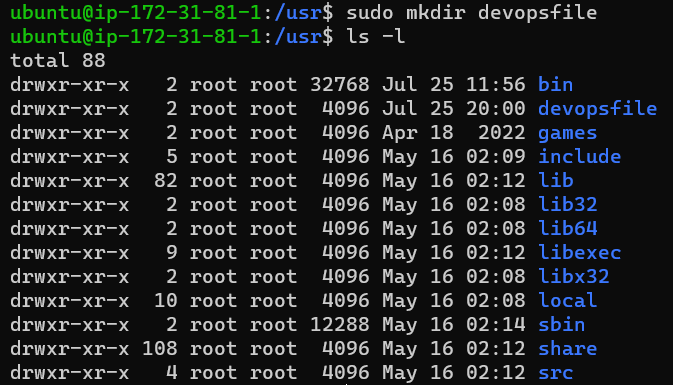
Now change the group owner from root to
devops(the group which I have created).
Now change the permission of your directory for group users and give them read, write and sticky access.

The sticky access for the group users is important. It gives access to other users of the same group to access the file and modify it. If this is not done, other users of the same group have permission to just read not write.
Now let's create a .txt file name
hello.txtin thedevopsfiledirectory.
You can also see the .txt file which I created and edited has a group user
devops. So every other user of thedevopsgroup can now access thehello.txtfile and edit it easily but any user who is not in thedevopsgroup can read the file. If we want that any user who is not a part ofdevopsgroup has no access to our files we can change the access permission for that too.
Now any user who is not in the
devopsgroup will not be able to view any file in thedevopsfile directory.
So this is a simple but mind-blowing example of how groups work. Hope you got some insights.


